Fax might seem like legacy technology, but it’s still widely used in healthcare, legal, finance, and government sectors. The problem? Traditional fax machines are clunky, and most cloud fax solutions are expensive or lack features businesses need.
That’s why I built eFax - a professional fax management system that brings faxing into the modern era.
Why I Built eFax
Working with VoIP systems and call centers, I kept running into the same problem: businesses needed fax capabilities but hated dealing with physical machines or paying premium prices for basic cloud fax services.
The requirements were always similar:
- Send and receive faxes digitally
- Multiple users with different permissions
- Email notifications when faxes arrive
- Searchable history and audit trails
- Self-hosted option for compliance
So I built exactly that.
The Dashboard
The dashboard gives you everything at a glance:
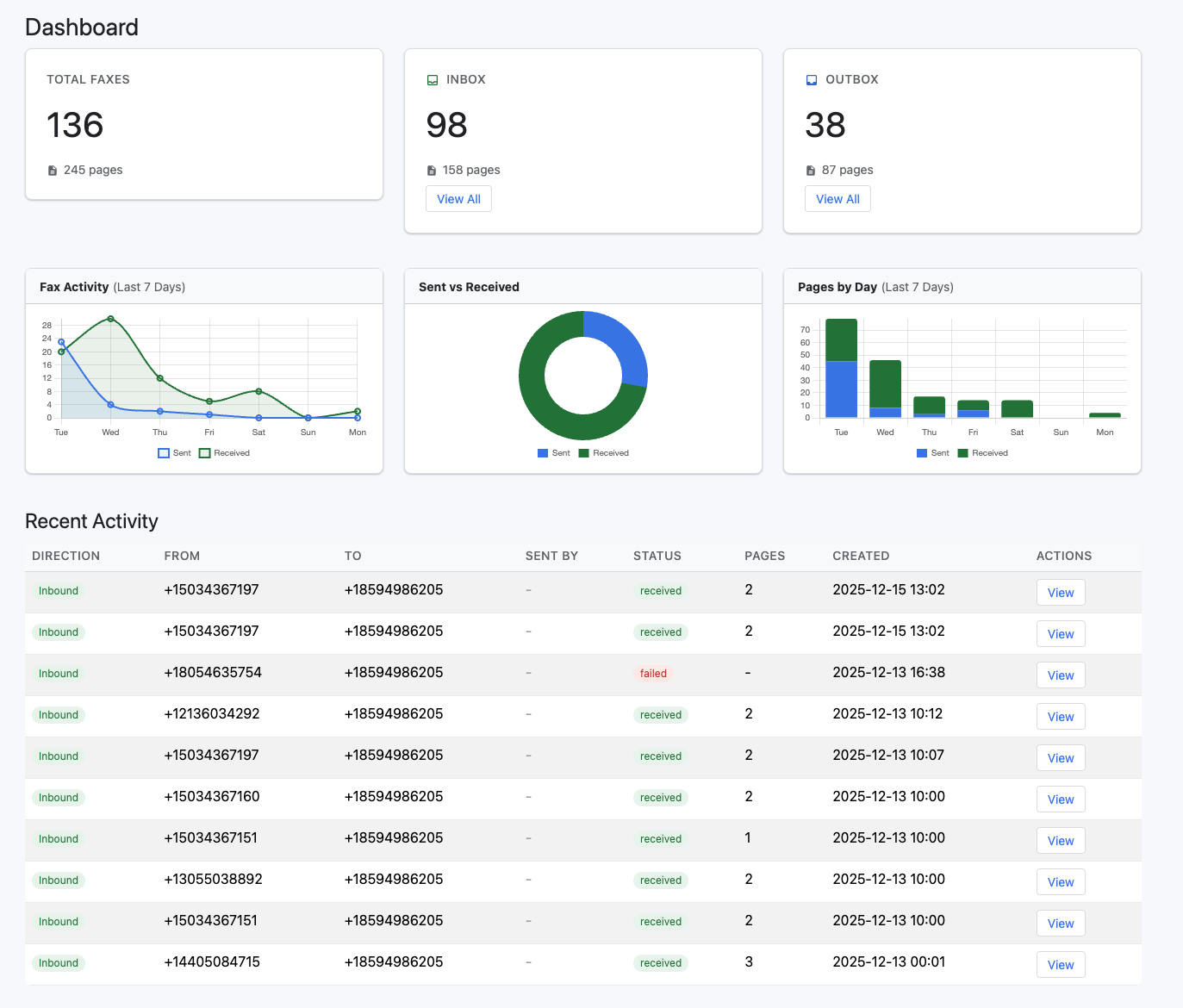
| Metric | Description |
|---|---|
| Total Faxes | Combined sent and received count |
| Inbox | Received faxes waiting for review |
| Outbox | Sent faxes with delivery status |
| Pages | Total pages processed |
Real-time charts show your fax activity over time, helping identify patterns and usage trends.
Inbox - Received Faxes
All incoming faxes land in your inbox with powerful search and filtering capabilities:
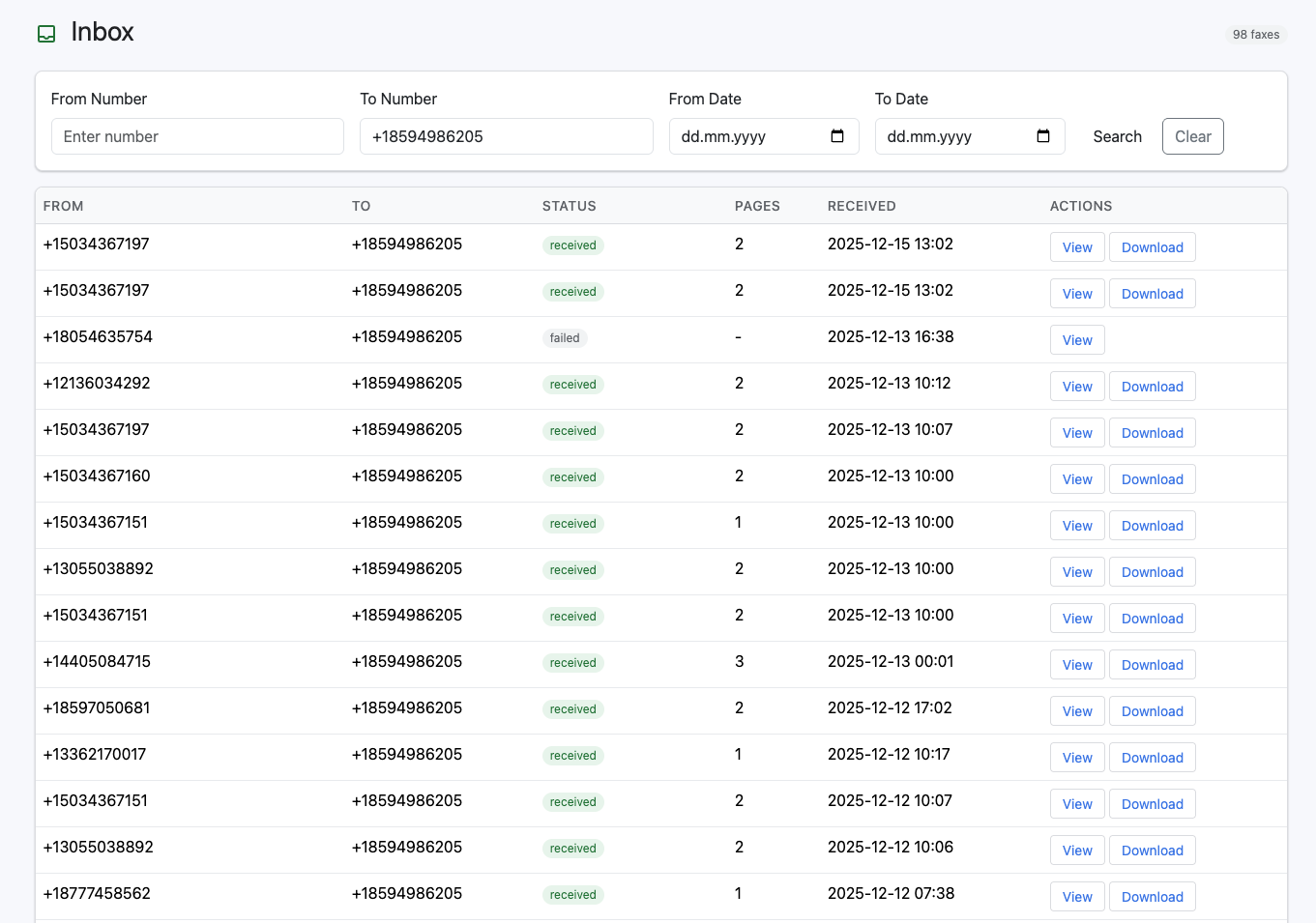
Search & Filter Features:
- Filter by sender number or recipient
- Date range filtering for historical lookup
- Status indicators (received, failed)
- Quick view and download options
At a Glance:
- From/To numbers clearly displayed
- Page count for each fax
- Timestamp with exact date and time
- One-click PDF download
Outbox - Sent Faxes
Track all your outgoing faxes with delivery status and history:
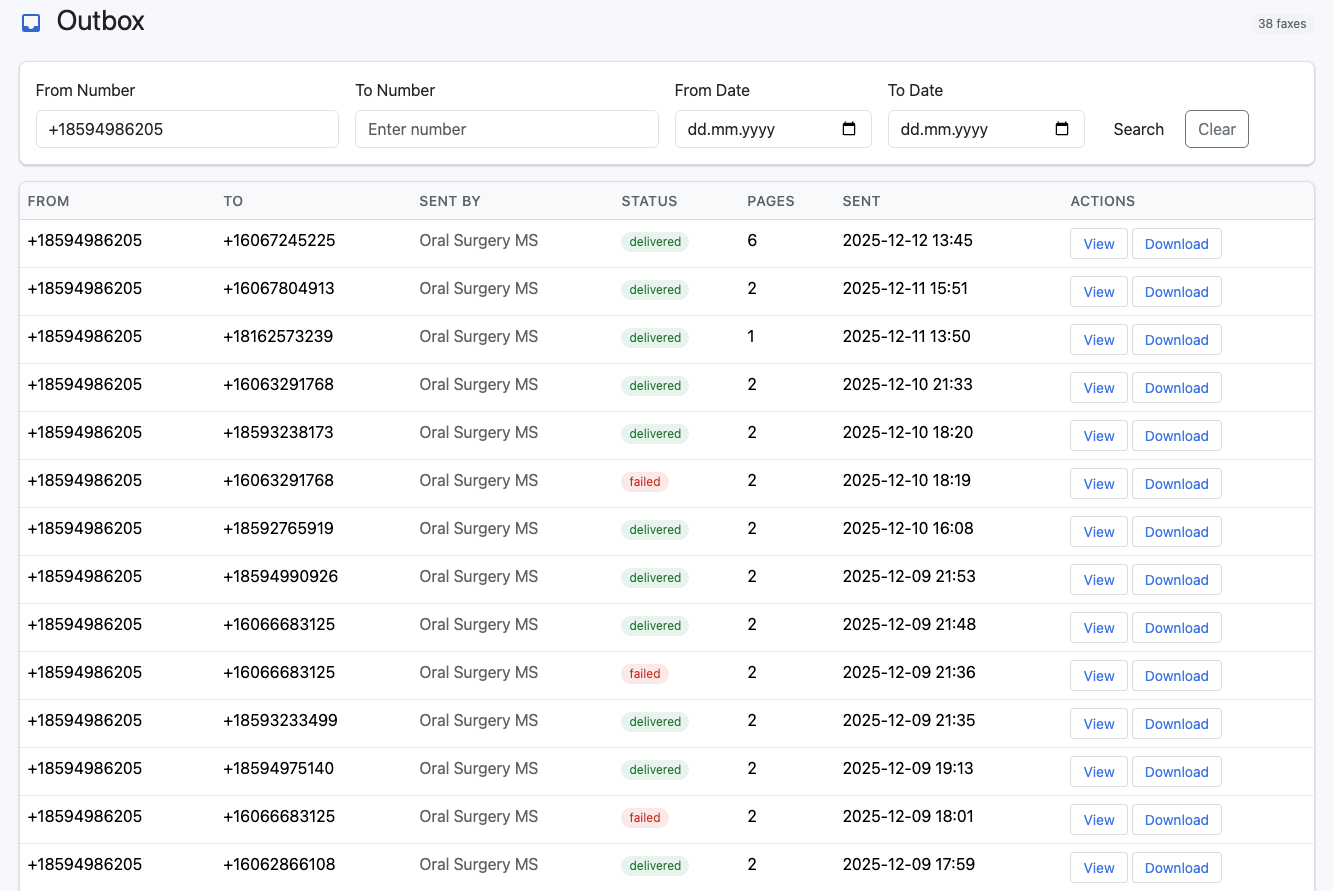
Delivery Tracking:
- Real-time status updates (delivered, failed)
- Sent by user tracking for accountability
- Page count and transmission details
- Retry failed faxes with one click
Fax Details & Activity Timeline
Every fax has a detailed view with complete audit trail:
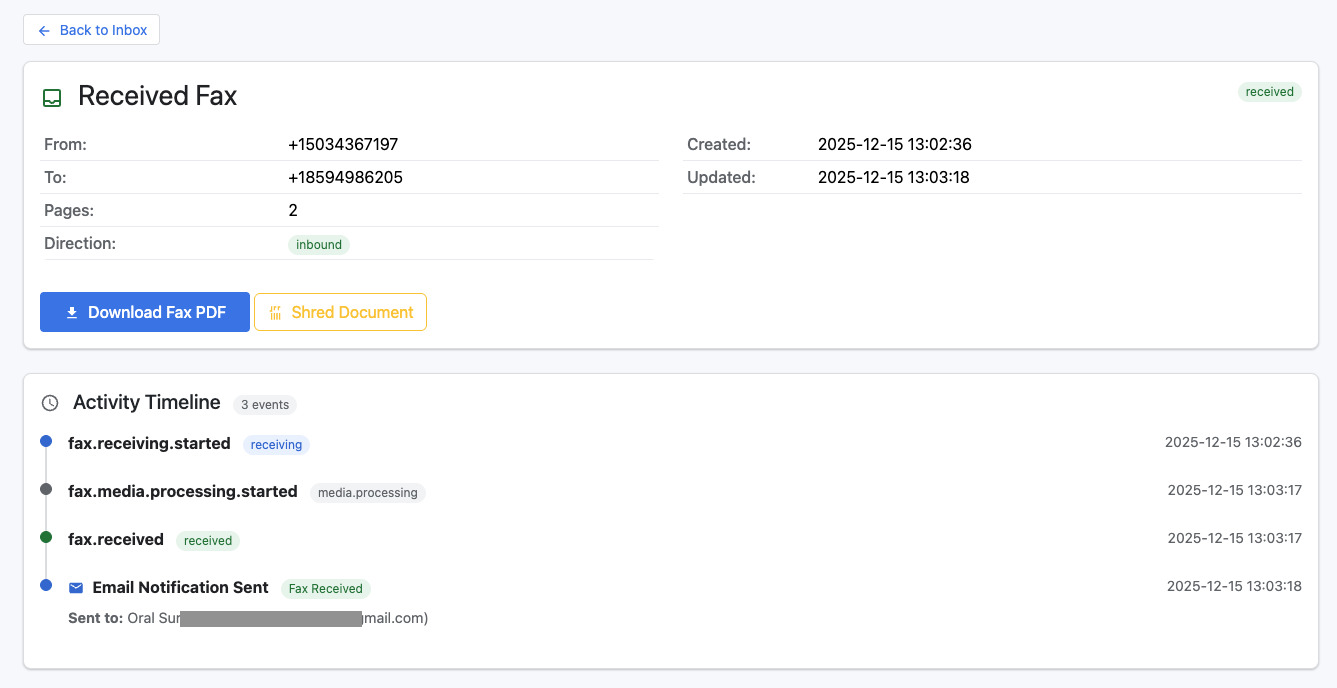
Fax Information:
- From/To numbers with direction indicator
- Page count and timestamps
- Status badge (received, delivered, failed)
- Download PDF or shred document options
Activity Timeline:
- Receiving started - Call connected
- Processing - Converting to PDF
- Received - Ready to view
- Email sent - Notification delivered
Perfect for compliance and troubleshooting.
Send Faxes Easily
Simple interface to send faxes with PDF upload and optional cover pages:
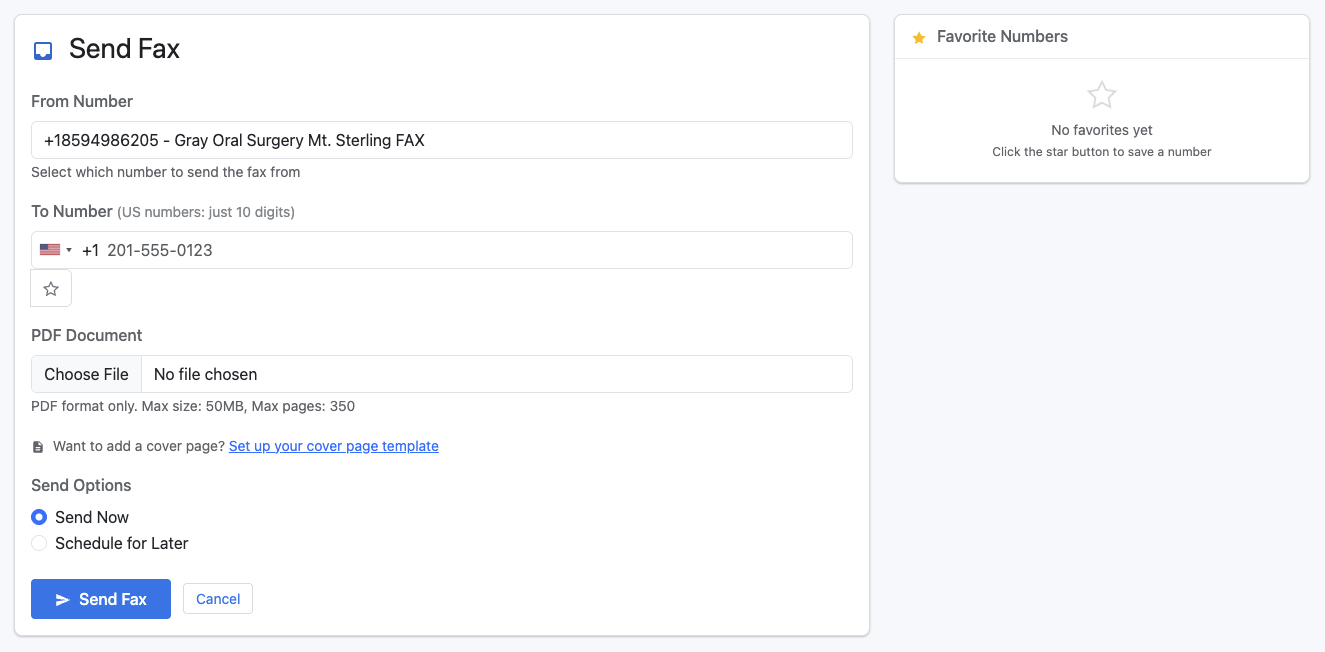
Sending Options:
- Select from your assigned fax numbers
- Enter recipient number with country code
- Upload PDF documents (up to 50MB, 350 pages)
- Add favorites for frequently used numbers
Advanced Features:
- Optional cover page with custom templates
- Send now or schedule for later
- Preview before sending
- Track delivery in real-time
Key Features
Send & Receive Faxes
Full two-way fax support through a clean web interface:
| |
Upload PDFs up to 50MB and 350 pages. Receive incoming faxes directly in your inbox with automatic PDF conversion.
Multi-User Support
Not everyone needs the same access level:
- Admins - Manage users, view all faxes, configure settings
- Users - Send faxes, view their own history
- Viewers - Read-only access to fax archives
Each user gets their own dashboard with relevant statistics.
Email Notifications
Get notified instantly when:
- A fax is received on your number
- Your outbound fax is delivered
- A fax fails (with retry options)
Emails include the fax as a PDF attachment - no need to log in for quick reviews.
Cover Page Templates
Professional cover pages with:
- Your company branding
- Recipient information
- Custom messages
- Page count indicators
Technical Details
eFax is built with:
- Modern web stack for the frontend
- RESTful API for integrations
- T.38 fax relay support for reliability
- PostgreSQL for data storage
Self-Hosted or Cloud
Two deployment options:
Self-Hosted: Run on your own infrastructure for complete control and compliance. Ideal for healthcare (HIPAA) and legal firms.
Hosted Service: Let me handle the infrastructure. Get a dedicated fax number and start sending within minutes.
How It Works
- Set Up Your Number - Get a new fax number or port your existing one
- Send Faxes - Upload PDF, enter recipient, click send
- Receive Faxes - Incoming faxes appear in your inbox with email alerts
- Manage & Archive - Search, filter, download, or shred when done
Use Cases
Healthcare
HIPAA-compliant fax delivery for patient records, prescriptions, and referrals. Self-hosted option keeps data on your servers.
Legal
Send contracts and legal documents with delivery confirmation. Activity timeline provides audit trails for compliance.
Real Estate
Fax signed documents, disclosures, and offers. Cover pages maintain professional appearance.
Finance
Secure transmission of financial documents with encryption and delivery tracking.
Getting Started
eFax is available now. Whether you need a hosted solution or want to run it on your own infrastructure, I can help you get set up.
Interested? Get in touch to discuss your requirements and see a demo.
eFax is part of my VoIP DevOps product suite, alongside VoiceDetect AMD for answering machine detection.