Most AI voice demos stop at “the AI answers the phone.” In any real business, that is only the front door. The interesting part is what happens when the caller asks for Sales, Support, or a specific person — and the call needs to land on a real human.
In this build I put a self-hosted FreeSWITCH PBX in front of a VAPI AI voice agent, with a Telnyx SIP trunk as the carrier. Calls land on FreeSWITCH first, get bridged out to VAPI for the AI conversation, and when the caller needs a human, VAPI issues a SIP REFER and FreeSWITCH rings the target extension — a softphone, a Yealink, or any registered SIP device.
Why a PBX in the Middle
Pointing a DID straight at VAPI works, but you lose everything a PBX gives you. By keeping FreeSWITCH in the middle you get:
- Routing and IVR — send different DIDs or menu selections to different assistants
- Recording — record the entire call, including the AI leg
- ACLs and security — IP-restrict the carrier, gate VAPI’s transfer-back
- Extensions — register real softphones and desk phones for your human agents
- Fail-over — if VAPI is unreachable, route to voicemail or a live queue
The AI becomes one more destination in your dialplan, not the whole phone system.
Call Flow
Step 1 — Carrier Delivers the Call to the PBX
A customer dials the Telnyx DID. Telnyx routes the SIP INVITE to the FreeSWITCH server using IP authentication — no registration needed.
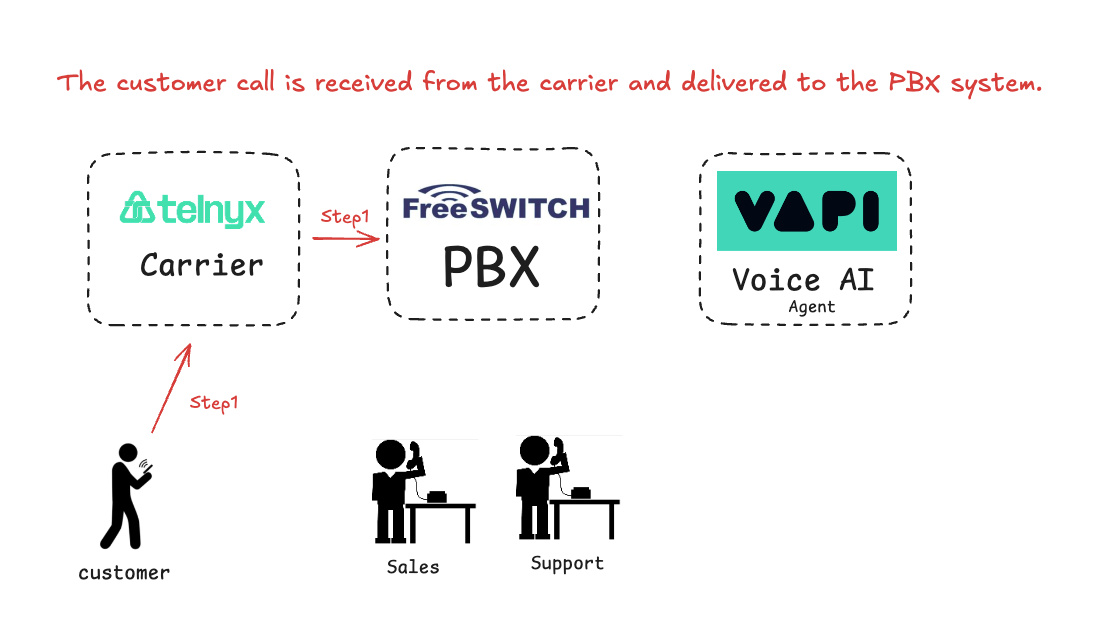
On the Telnyx side this means creating a SIP Connection with IP auth, assigning a DID, and pointing it at the FreeSWITCH public IP on port 5060. On the FreeSWITCH side, an ACL allow-list for Telnyx signaling and an inbound dialplan matching the DID.
Step 2 — PBX Hands the Call to the AI Agent
FreeSWITCH answers the call and bridges it to VAPI over an outbound SIP gateway. VAPI handles the conversation.
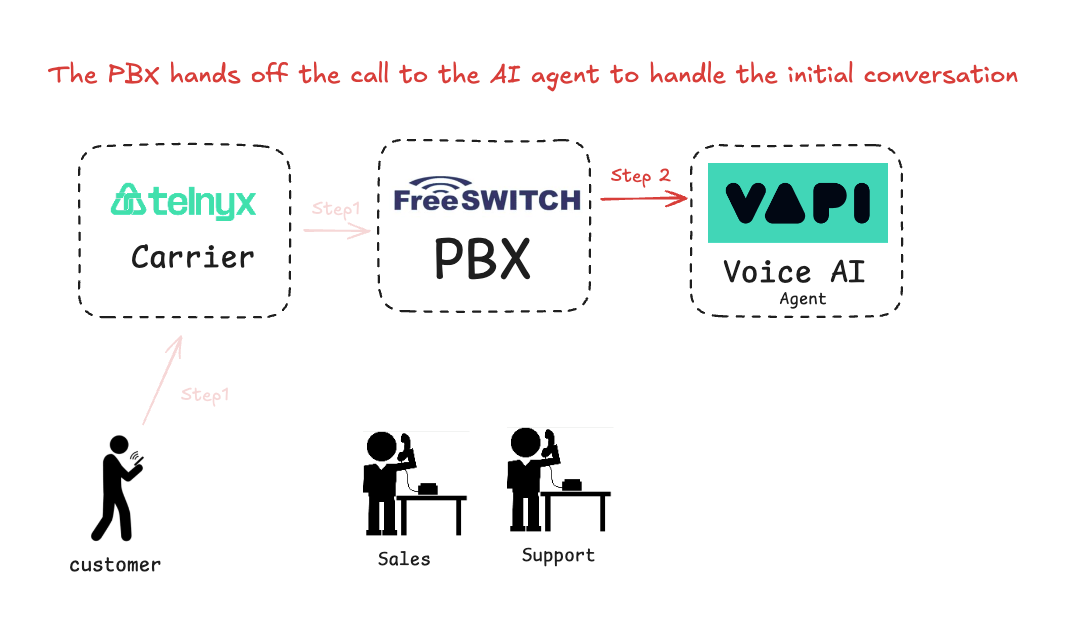
On the VAPI side this is a BYO SIP Trunk credential attached to the assistant. On the FreeSWITCH side, an outbound gateway to sip.vapi.ai and a bridge from the inbound dialplan. The key detail here is the answer → sleep 1000 → bridge sequence — without that brief pause, VAPI’s media channel may not be ready and early audio gets lost.
Step 3 — AI Transfers to a Human Agent
When the caller asks for Sales or Support, VAPI issues a SIP REFER back to FreeSWITCH. FreeSWITCH authenticates the transfer and rings the target extension (e.g., 1001), where a softphone is registered.
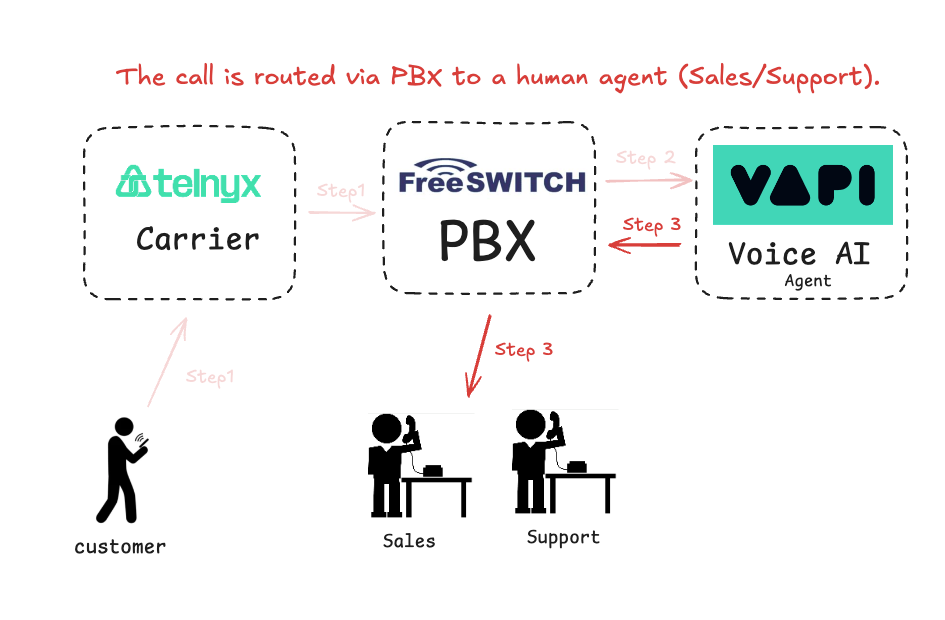
The trick on the FreeSWITCH side is having a directory user for VAPI whose credentials match the BYO trunk — that way the re-INVITE triggered by the REFER authenticates cleanly instead of getting challenged into a loop.
Stack
- Telnyx — SIP trunk + DID (IP authentication)
- FreeSWITCH on Debian 12 — the PBX in the middle
- VAPI — BYO SIP trunk + AI assistant
- Zoiper / Yealink — softphone registered as the human agent extension
What You Can Build on Top
Once this skeleton is in place, the usual PBX tricks apply:
- Multiple AI assistants per DID or IVR selection
- Business-hours routing — AI during the day, voicemail after hours
- Queues and hunt groups for human transfers
- Call recording for QA and training
- Warm transfer where the AI briefs the human before dropping off
The point of the video is less “here is the final config” and more “here is a pattern that works” — a self-hosted PBX can absolutely live in front of a hosted AI voice agent, and the human transfer problem is solvable with plain SIP.
Watch It
FreeSWITCH + VAPI + Telnyx on YouTube →
If this is useful and you want help wiring something similar for your own numbers, get in touch.