If you run a call center with VICIdial or any Asterisk-based dialer, you know the pain of Asterisk’s built-in AMD. It’s slow, inaccurate, and hasn’t evolved in years. Agents waste time on voicemails, and good leads get hung up on.
I built VoiceDetect AMD to solve this problem using modern AI and speech-to-text technology.
The Problem with Traditional AMD
Asterisk’s built-in AMD uses audio pattern detection - analyzing silence, tone patterns, and timing. The problems:
- Slow: Takes 4-5+ seconds to make a decision
- Inaccurate: High false positive rates, especially with varied greetings
- No learning: Can’t improve based on your specific call patterns
- Black box: No visibility into why decisions are made
How VoiceDetect Works Differently
Instead of guessing based on audio patterns, VoiceDetect actually listens to what’s being said:
- Stream audio via WebSocket when call connects
- Transcribe speech using cloud STT (OpenAI Whisper, Deepgram)
- Classify transcript with a trained ML model
- Return decision - Human or Machine - in ~3 seconds
The key insight: “Hi, you’ve reached John’s voicemail…” is obviously a machine. A human would say “Hello?” or “This is John”. By understanding the words, not just the audio patterns, we get much better accuracy.
The Dashboard
Monitor your AMD performance in real-time:
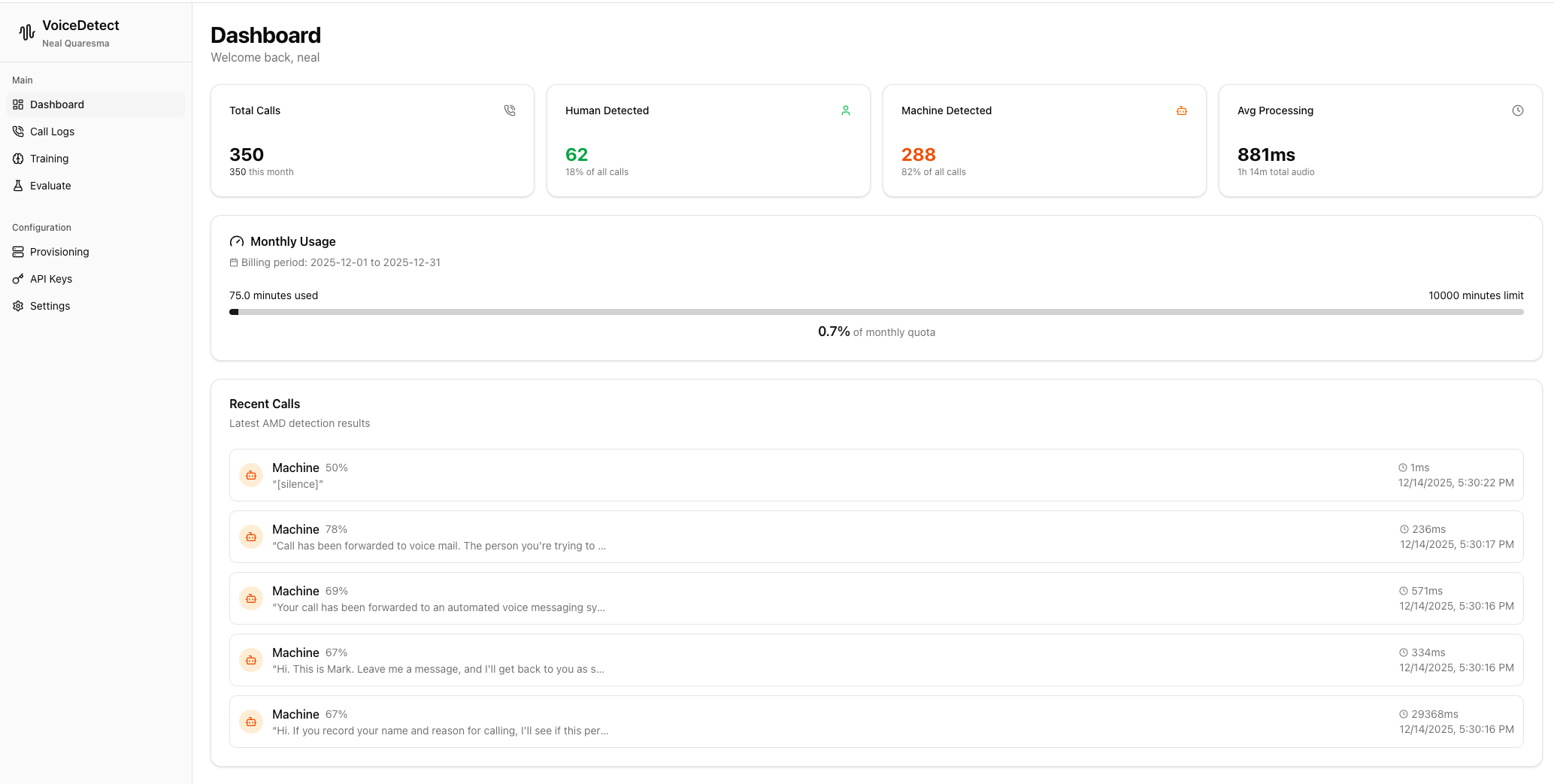
| Metric | What It Shows |
|---|---|
| Total Calls | All calls processed through VoiceDetect |
| Machine Detected | Percentage of calls classified as voicemail/IVR |
| Avg Processing | Typical decision latency (usually 200-800ms after speech) |
| Monthly Minutes | Usage tracking against your quota |
Call Logs - Full Visibility
Every call is logged with complete details:
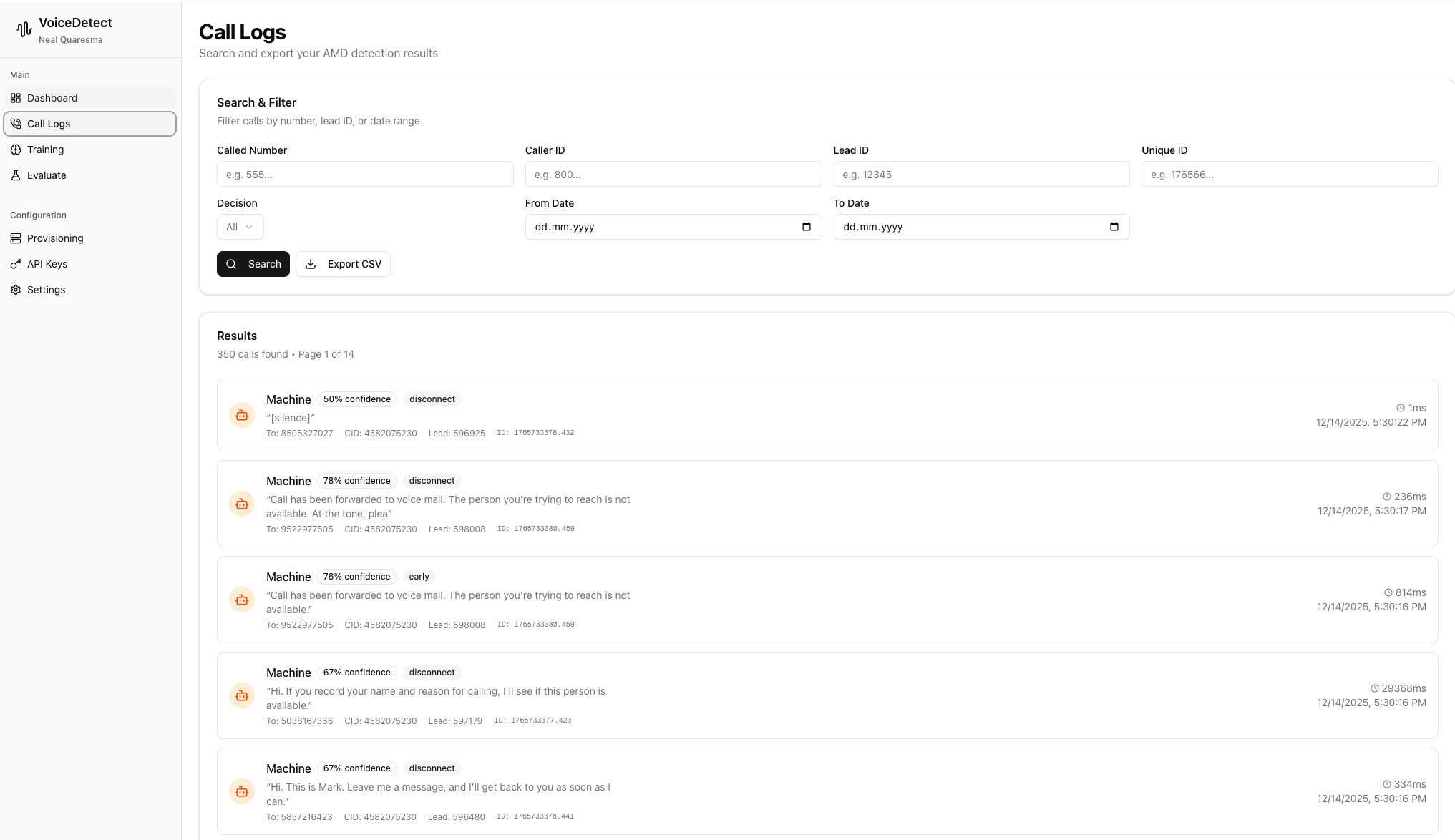
Search & Filter:
- Filter by Called Number, Caller ID, Lead ID, or Unique ID
- Filter by decision type (Human/Machine)
- Date range filtering for historical analysis
- Export to CSV for reporting
For Each Call:
- Full transcript of detected speech
- Confidence percentage
- Processing latency
- VICIdial integration data (Lead ID, CID)
This visibility is crucial for debugging and improving your classifier.
Train Your Own Classifier
This is where VoiceDetect really shines. Each tenant gets their own ML classifier that you can train:
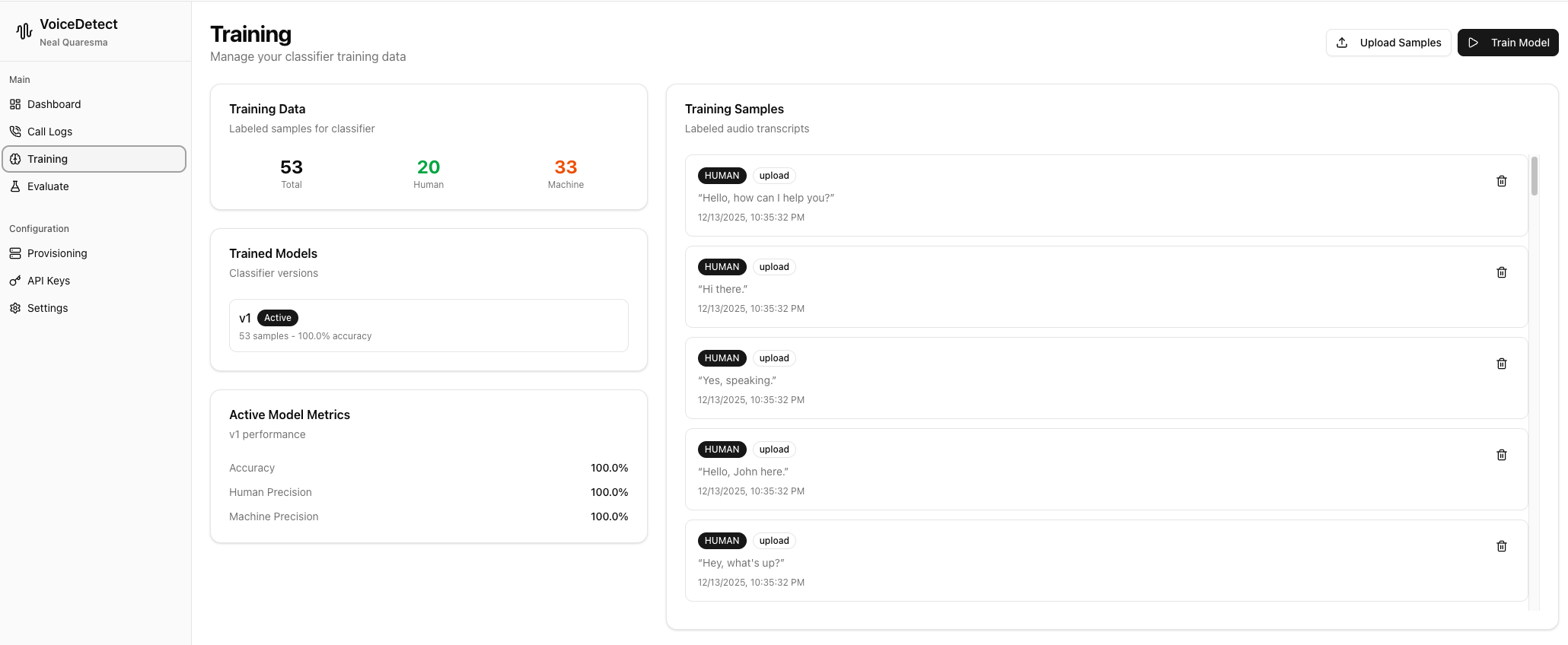
How Training Works:
- Upload audio samples or text transcripts
- Label each sample as Human or Machine
- Click train - model rebuilds with your data
- Deploy the new model version
Your classifier learns from YOUR call patterns. Spanish call center? Train on Spanish samples. B2B calls with professional greetings? Train on those. The model adapts to your specific use case.
Test Before You Deploy
Before going live with a new model, test it:
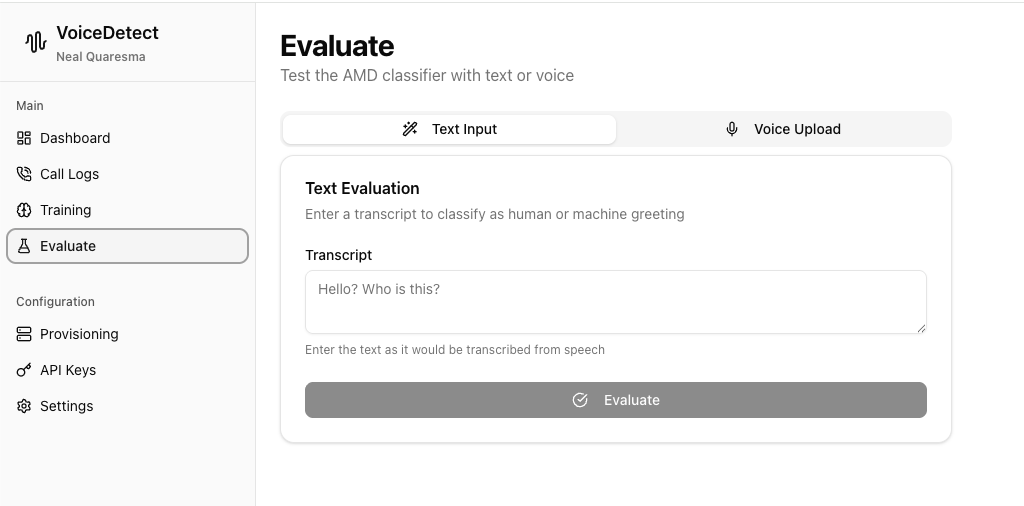
Two Testing Methods:
- Text Input: Paste a transcript to see how it would be classified
- Voice Upload: Upload an audio file for full end-to-end testing
See the classification result and confidence score. Debug edge cases before they affect your campaigns.
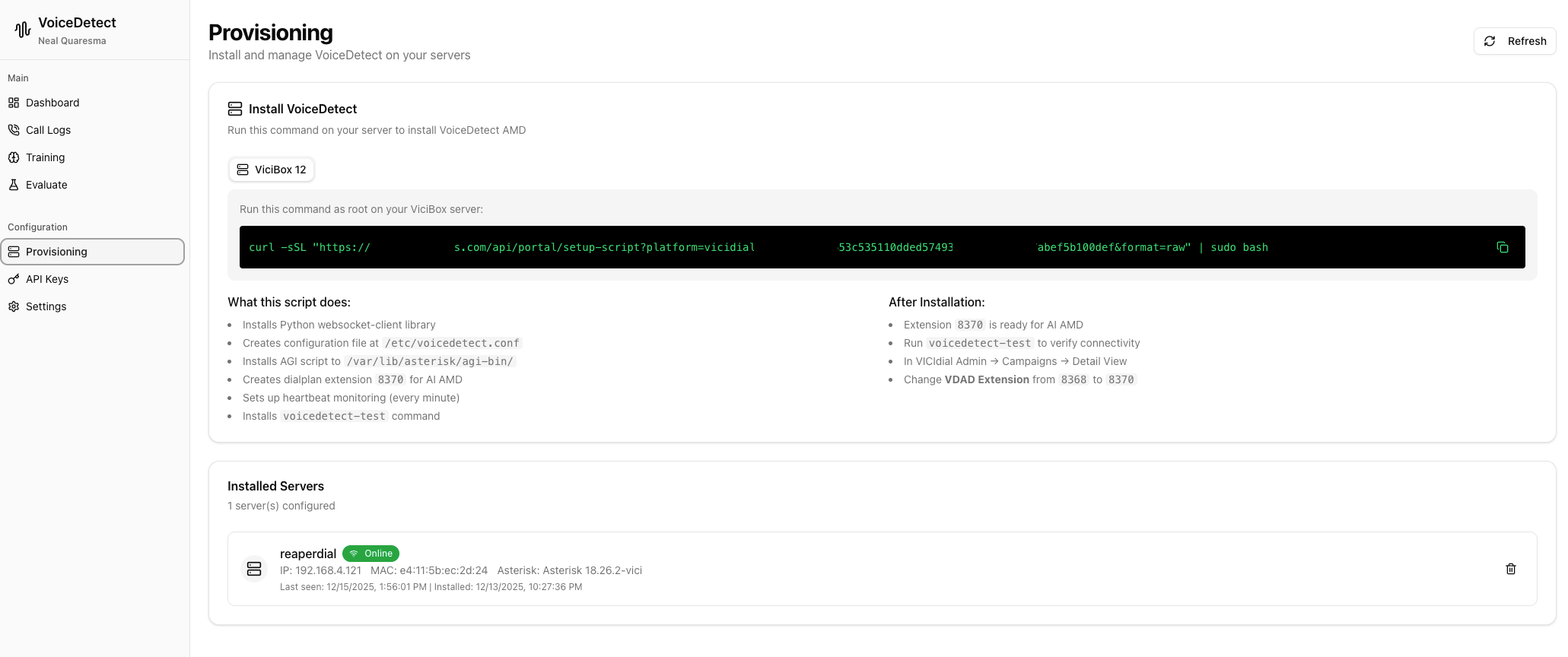
One-Command Installation
Deploy to your VICIdial/ViciBox servers with a single command:
| |
What Gets Installed:
- Python websocket-client library
- Configuration file at
/etc/voicedetect.conf - AGI script at
/var/lib/asterisk/agi-bin/ - Dialplan extension 8370 for AI AMD
- Heartbeat monitoring (every minute)
voicedetect-testcommand for verification
Server Monitoring:
- Track all installed servers in the dashboard
- Online/offline status with heartbeat
- View server details (IP, Asterisk version)
- Last seen timestamp for troubleshooting
Fine-Tune AMD Behavior
Customize timing and thresholds to match your needs:
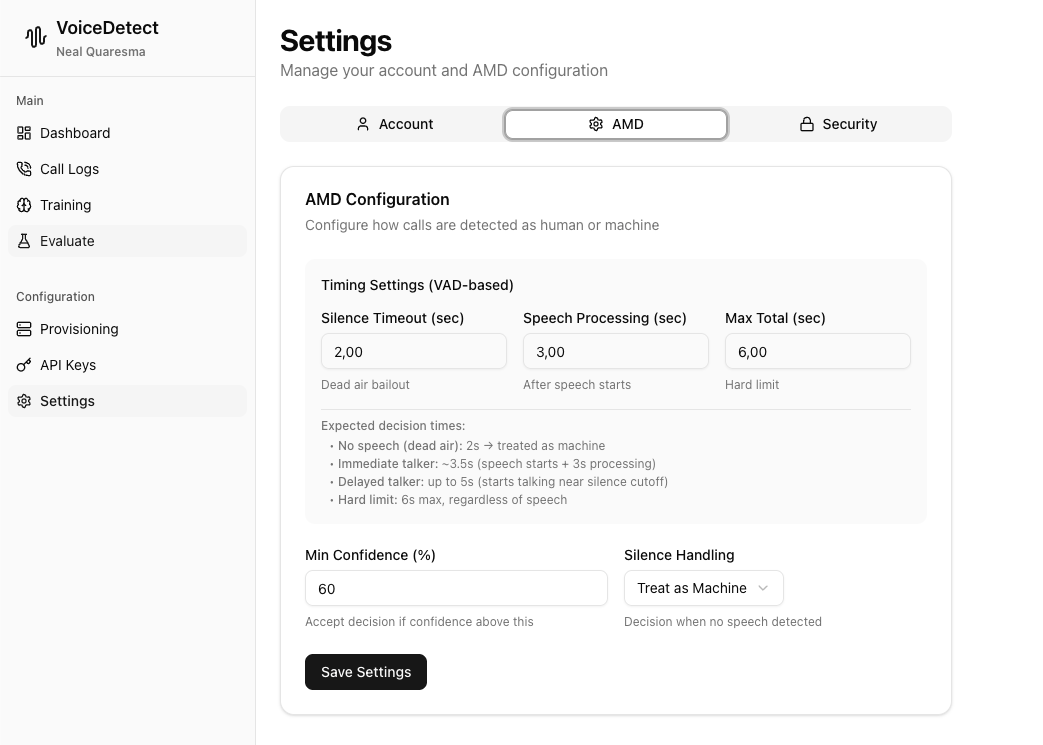
Timing Settings:
- Silence Timeout: How long to wait with no speech (default 2s)
- Speech Processing: Time after speech starts (default 3s)
- Max Total: Hard limit regardless of speech (default 6s)
Decision Thresholds:
- Min Confidence: Only accept decisions above this threshold (default 60%)
- Silence Handling: Treat no speech as Human or Machine
Expected Decision Times:
- Dead air (no speech): ~2 seconds
- Immediate talker: ~3.5 seconds
- Delayed talker: up to 5 seconds
- Hard limit: 6 seconds max
Key Features
No GPU Required
VoiceDetect uses cloud STT APIs (OpenAI Whisper, Deepgram) for transcription. Run on any server without expensive GPU hardware.
Multi-Tenant Architecture
Each customer gets:
- Their own trained classifier
- Isolated call logs and data
- Custom thresholds and settings
- Separate usage tracking
VICIdial Integration
Drop-in replacement for Asterisk AMD:
- EAGI integration
- Works with existing dialplan
- Lead ID and CID passthrough
- Compatible with ViciBox
Real-Time WebSocket Streaming
Low-latency audio streaming means faster decisions. No waiting for the call to buffer - analysis happens as speech is detected.
Technical Flow
- Call Connects → Audio streams to VoiceDetect via WebSocket
- VAD Detection → Voice Activity Detection identifies speech
- STT Transcription → Cloud API converts speech to text
- ML Classification → Your tenant-specific model analyzes the transcript
- Decision Returned → Human or Machine result via WebSocket
- Asterisk Routes → Route to agent or hangup
Total time: approximately 3 seconds from answer to decision.
Use Cases
Outbound Call Centers
Reduce agent idle time by filtering voicemails before connection. More conversations per hour, better agent utilization.
Predictive Dialers
Make smarter routing decisions. Connect humans to agents, drop machines automatically.
Lead Verification
Verify that leads have valid, human-answered phone numbers before adding to campaigns.
Compliance
Some regulations require human confirmation. VoiceDetect provides auditable logs of every classification decision.
Getting Started
VoiceDetect AMD is available as a hosted service or self-hosted solution.
Interested? Get in touch to discuss your requirements and see a demo.
VoiceDetect AMD is part of my VoIP DevOps product suite, alongside eFax for professional fax management.